
How to Complete Your Ingoing Condition Report

Key Takeaways
- Your ingoing condition report records your rental property's condition on move-in day. Sydney Realty Group completes it first, then sends it to you digitally to review and sign.
- You complete it on your phone through Inspection Manager — no app to download. Just tap the link in our email.
- You have 7 days to review, add photos, and return it under section 29 of the Residential Tenancies Act 2010 (NSW).
- If you do not return it in 7 days, the report we sent becomes the agreed record used at the end of your tenancy.
Your ingoing condition report is the record of your rental property's condition on the day you move in. Your leasing manager will complete it first, then sends it to you digitally through Inspection Manager to review, add to, and sign. You have 7 days to return it under NSW tenancy law — this guide walks you through every step.
What Is an Ingoing Condition Report?
An ingoing condition report is a room-by-room record of the property's condition: walls, floors, fixtures, and appliances, supported by photos and signed by both landlord and tenant. Under section 29 of the Residential Tenancies Act 2010 (NSW), your agent must give you a completed report — including one electronic copy — at or before the start of your tenancy. Our standard practice is to document each property in detail before you arrive. For a one-bedroom apartment our team typically captures over 200 photos, and over 400 for a standard two-bedroom — so the rental condition report reflects exactly what you have moved into.
Why Does Your Condition Report Matter So Much?
Your condition report is the evidence used to settle bond and damage claims at the end of your tenancy. A report signed by both parties is presumed correct under NSW tenancy law.
Section 30 of the Residential Tenancies Act 2010 (NSW) makes a signed condition report the official record of the property's condition at move-in. At the end of your tenancy, it is compared against the outgoing inspection to decide what — if anything — is your responsibility versus fair wear and tear.
We highly recommend that you put the time in to verifying your condition report before signing off and returning to us.
How Do You Complete It in Inspection Manager?
You complete your condition report on your phone through the Inspection Manager link we email you. Review each room, agree or add a comment, then sign — no app download needed.
Follow these steps on your phone or tablet:
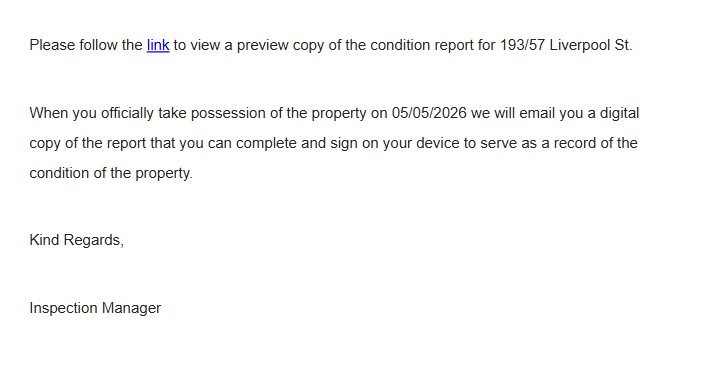
- Open the email from Sydney Realty Group and tap the link to view your report.
- On the welcome screen, tap Get Started and confirm your property address.
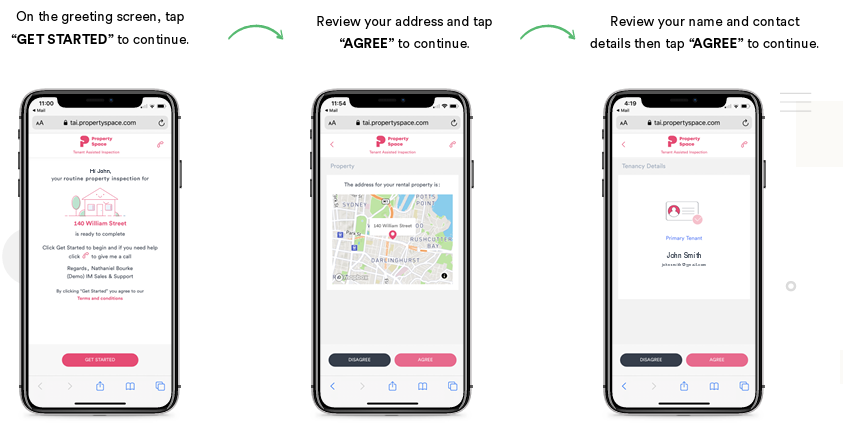
- Tap the first room or area to begin. You can work through them in any order.
- Read our note and photos for each item. Tick to agree if it matches what you see — or mark it as disagree and add a short comment if something is wrong or worse than recorded.
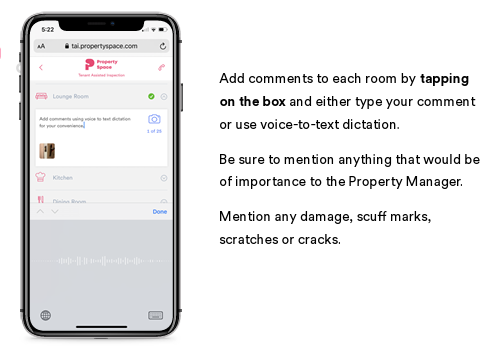
- Add your own photos of any damage or marks our team missed — tap the camera icon and take the photo straight from your phone.
- Once you have been through every room, tap Complete and sign in the signature box. The report returns to us automatically and you keep a copy.
Not sure what to do when you reach an item? The table below explains each option and when to use it.
What Happens If You Don't Return It in 7 Days?
If you do not return your condition report within 7 days, the version we sent becomes the agreed record of the property's condition at move-in.
Section 29 of the Residential Tenancies Act 2010 (NSW) gives you 7 days from taking possession to complete and return your copy. After that, section 30 treats the report we holds as the presumed-correct record — and that record is used at the end of your tenancy when comparing ingoing and outgoing.
Our software partner Inspection Manager sends you automatic reminders before the deadline expires. If the report is not returned in time, it closes automatically and the final copy is emailed to both you and SRG, once this file is closed, we will not be able to reopen it or allow for further adjustments, so please put this on the top of your to do list.
Frequently Asked Questions
Related Articles
How your bond is held by NSW Fair Trading, when it is released, and how your condition report affects the outcome.
What our property managers check during a routine inspection and how to prepare.
The official NSW guidance on condition reports for renters, including what must be included.
The legislation covering condition report obligations under sections 29, 30, and 31.
Need a hand with your condition report?
If your link has expired, landed in junk, or you are stuck on a step, our team is here to help. Email us at support@sydneyrealtygroup.com.au
All information in this knowledge base is believed to be in line with the current laws and regulations in NSW, Australia. However, should these laws change in the future, the information provided here may become outdated and no longer valid. This knowledge base is not intended to be used as evidence or a guarantee of specific outcomes. It is merely a guide to assist you in understanding the process and is not an authoritative resource. We recommend that you conduct your own research and, if necessary, seek legal advice for specific situations.